
AI-powered grant compliance tracking
Every grant requirement and deadline, tracked in one place.
Upload a grant agreement and GrantGuard extracts the requirements, deadlines, and budget conditions, then helps your team stay on top of them. Built for nonprofits and local governments.
- No credit card required
- Upload a grant agreement PDF
- Set up by our team within one business day
Built for the teams that manage grants on top of everything else
GrantGuard is designed for organizations without a large grants office.

Small nonprofits
One person carries every grant in their head.
Put each funder's reporting dates and restrictions in a shared system, so compliance doesn't depend on one inbox or one staff member.

Cities & counties
Grants are spread across departments.
Give finance and program staff one view of every award's requirements, deadlines, and spending conditions ahead of your annual audit.

Special districts
Large awards, very lean staff.
Track the conditions attached to state and federal infrastructure funding without adding a dedicated grants administrator.

K-12 & education
Many funding streams, each with its own rules.
Keep allowable-use rules, reporting calendars, and supporting documents organized by grant instead of by spreadsheet tab.
Not sure it fits your organization? Book a 30-minute demo
What you get with GrantGuard
Replace the spreadsheet, the shared-drive folders, and the calendar reminders with one system that knows what each grant agreement requires.
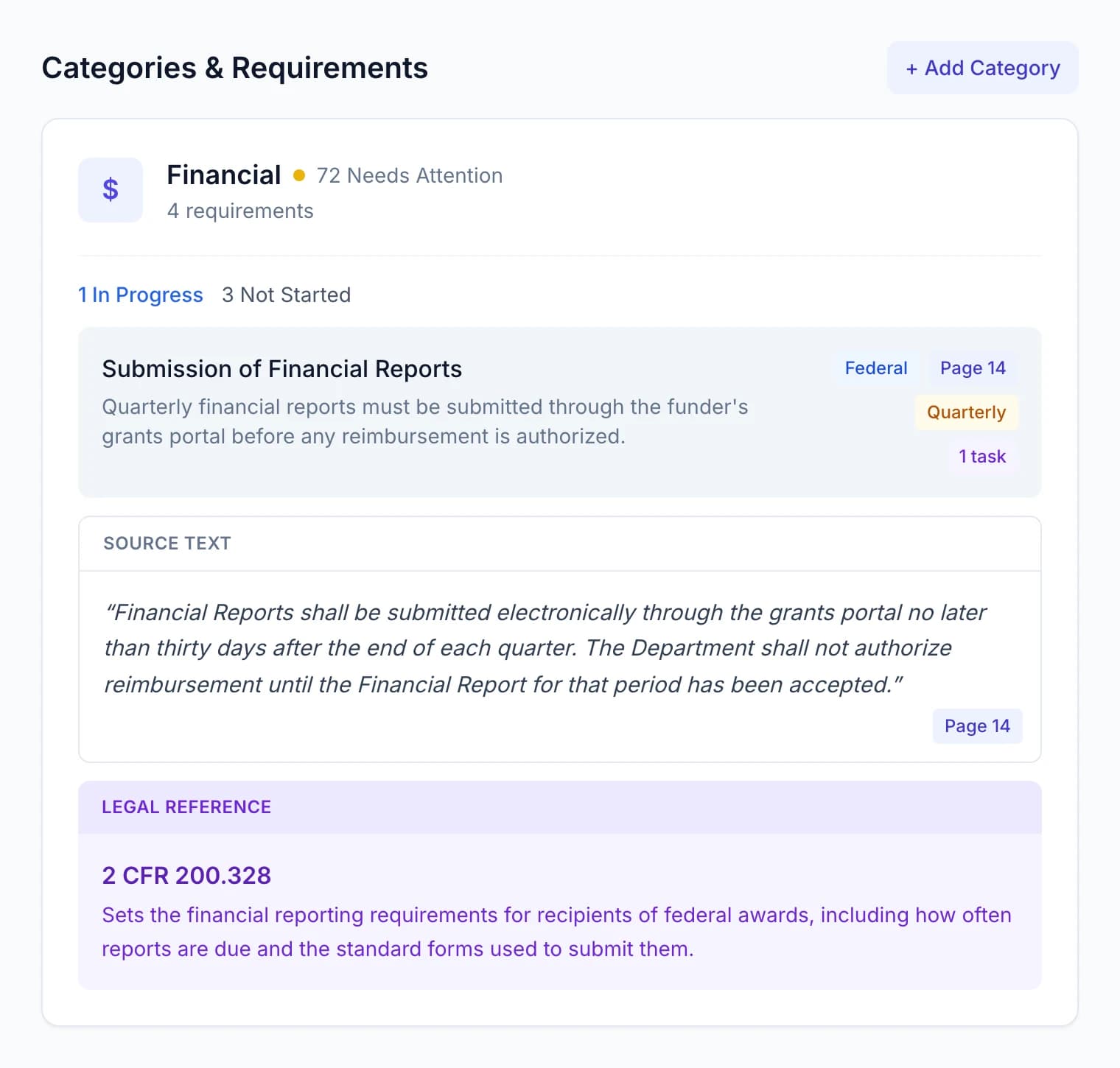
AI document analysis
Every requirement, with the clause it came from
Upload a grant agreement PDF and GrantGuard extracts the requirements, deadlines, and budget conditions, grouped into compliance categories.
- The source text and page number sit beside each requirement, so you can check it in seconds.
- Related regulations are summarized in plain language.
- Edit, add, or remove anything. The extraction is a starting point you review.
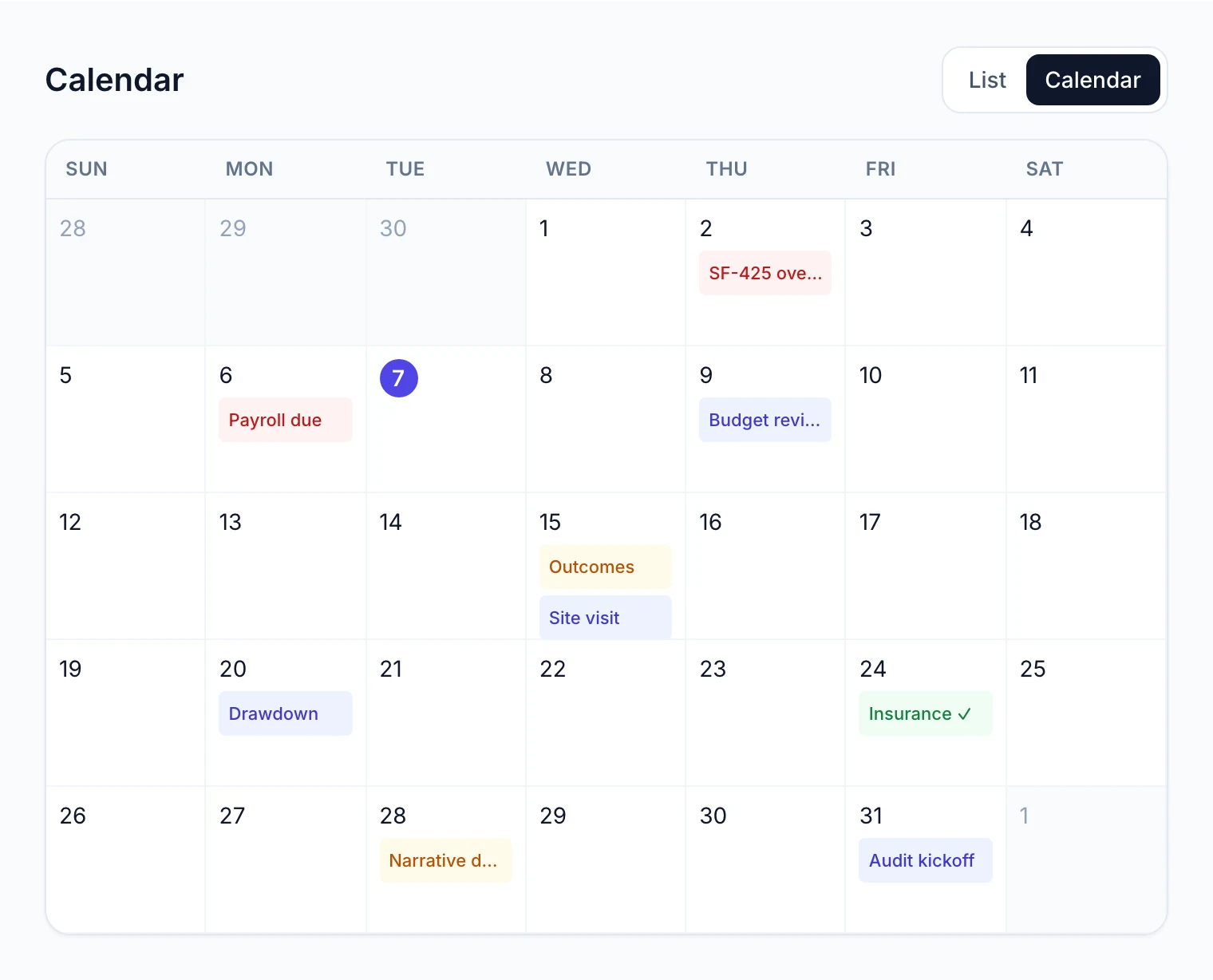
Deadline calendar and alerts
Reports aren't started the night before
Every reporting date and task across all your grants lands on one calendar, with notifications ahead of each deadline.
- Overdue, upcoming, and completed items are colored differently at a glance.
- Choose how far ahead your team is notified.
- Filter by grant, or switch to a simple list.
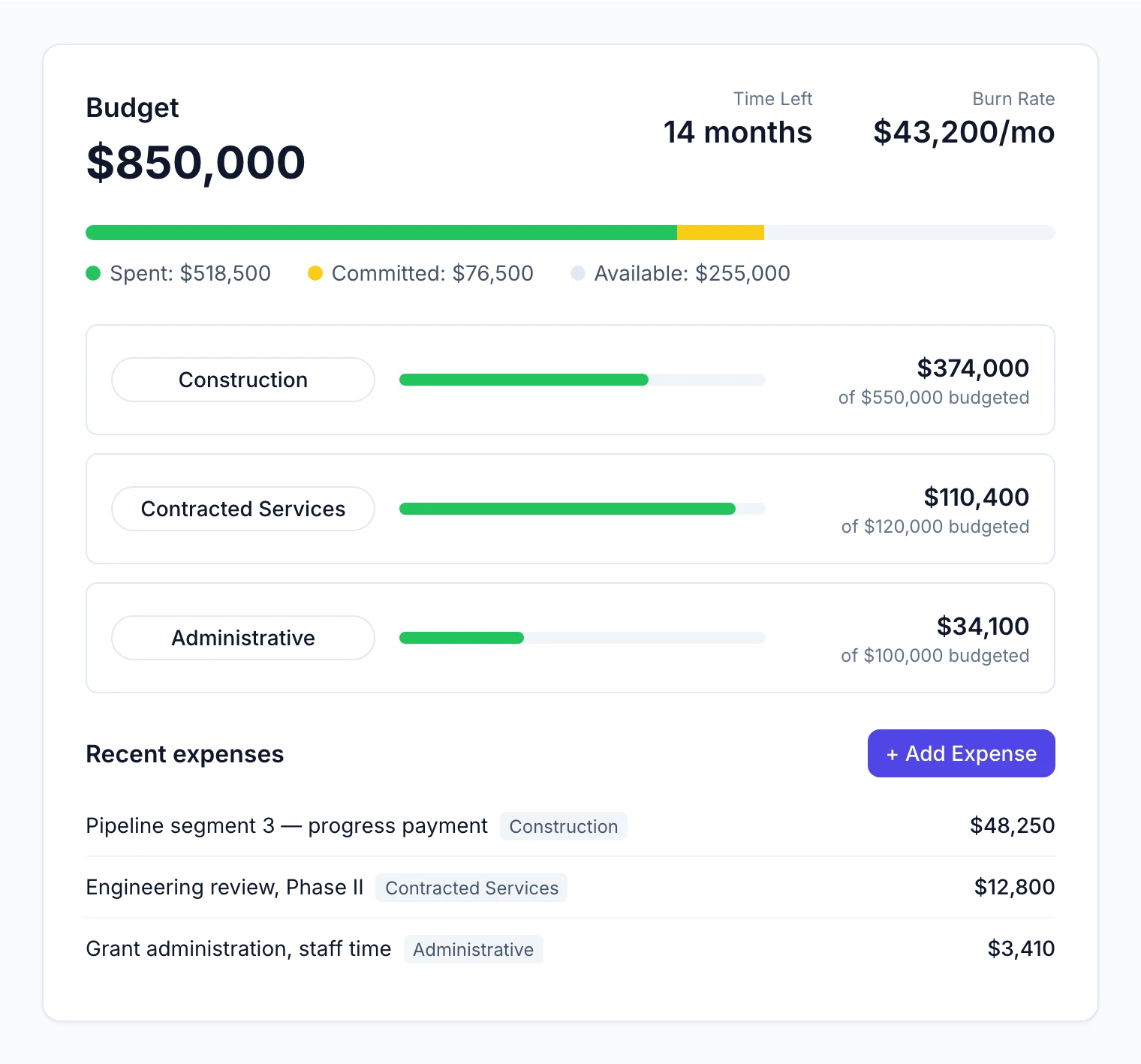
Budget tracking
Spending, next to the conditions on the award
Record expenses against each grant's budget and see what is spent, committed, and still available by category.
- An alert when a grant's spending passes 90% of its budget.
- Attach receipts and invoices to the expense they support.
- Burn rate and time left on the award, without a separate workbook.
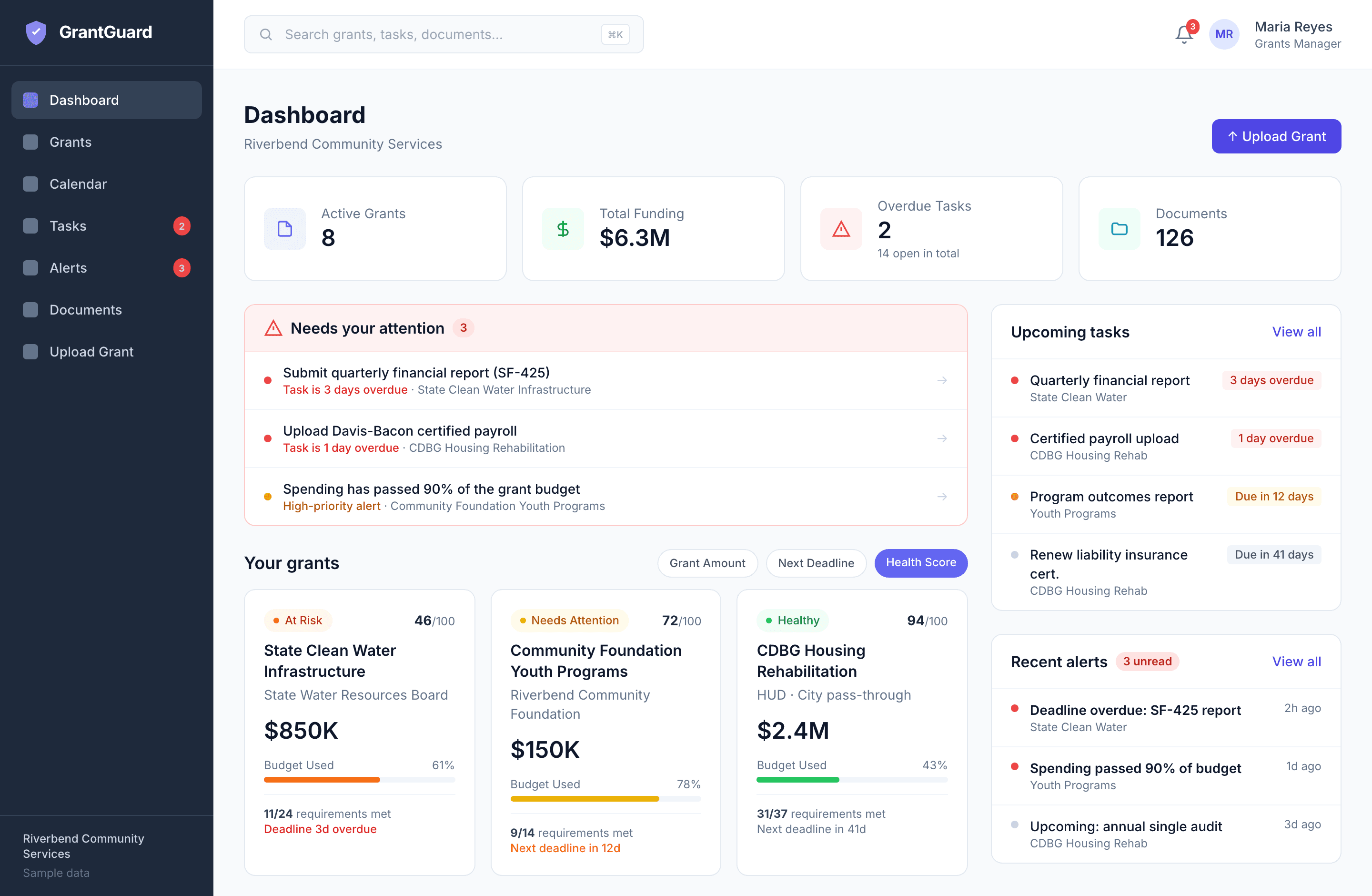
Compliance Dashboard
A compliance health score for every grant, so you can see at a glance which awards are on track and which need attention.
Tasks, Documents & Reports
Assign tasks, keep supporting documents with the requirement they support, and generate compliance reports when a funder or auditor asks.
Security & Data Protection
Data is encrypted in transit and at rest, access is role-based, and your documents are not used to train AI models.
Screens show sample data for illustration.
See these on your own grants. Start your free 30-day trial
From grant agreement to compliance dashboard in three steps
Request a trial and our team sets up your workspace within one business day. After that, it works like this.
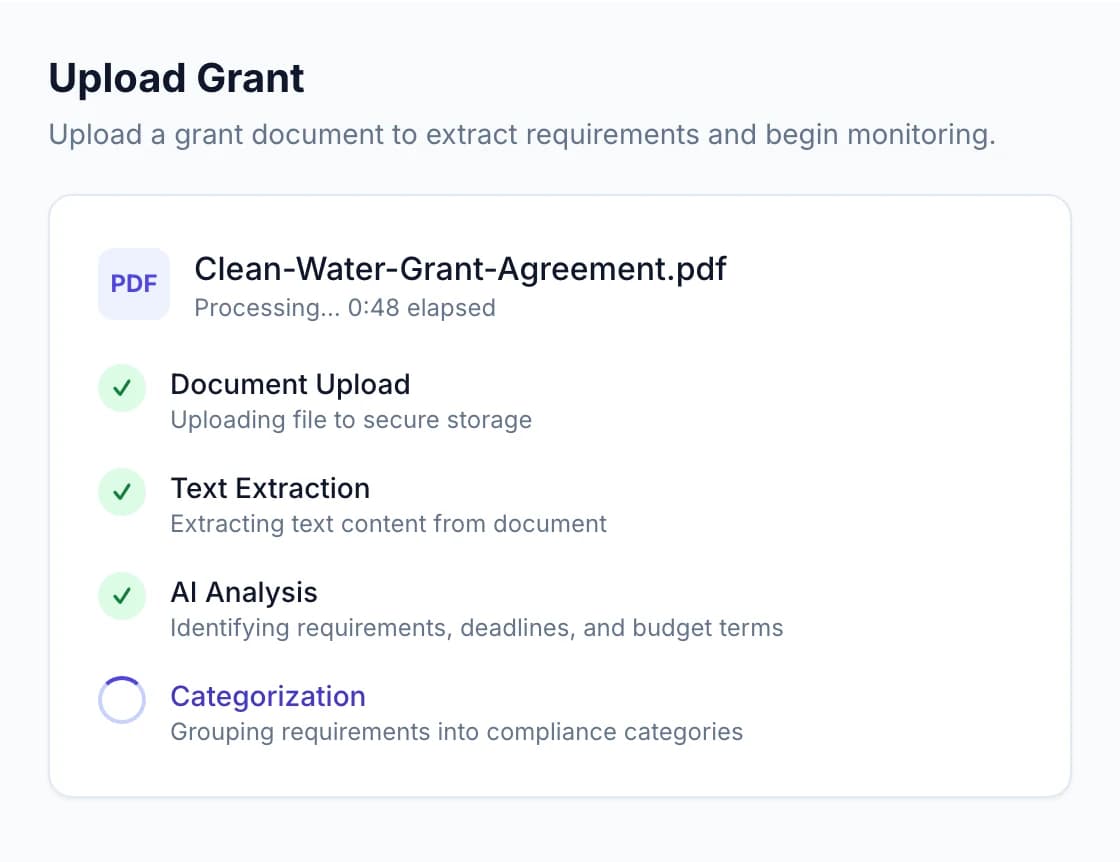
STEP 01
Upload your grant agreement
Upload the grant agreement as a PDF (up to 50 MB). That's the only document you need to get started.
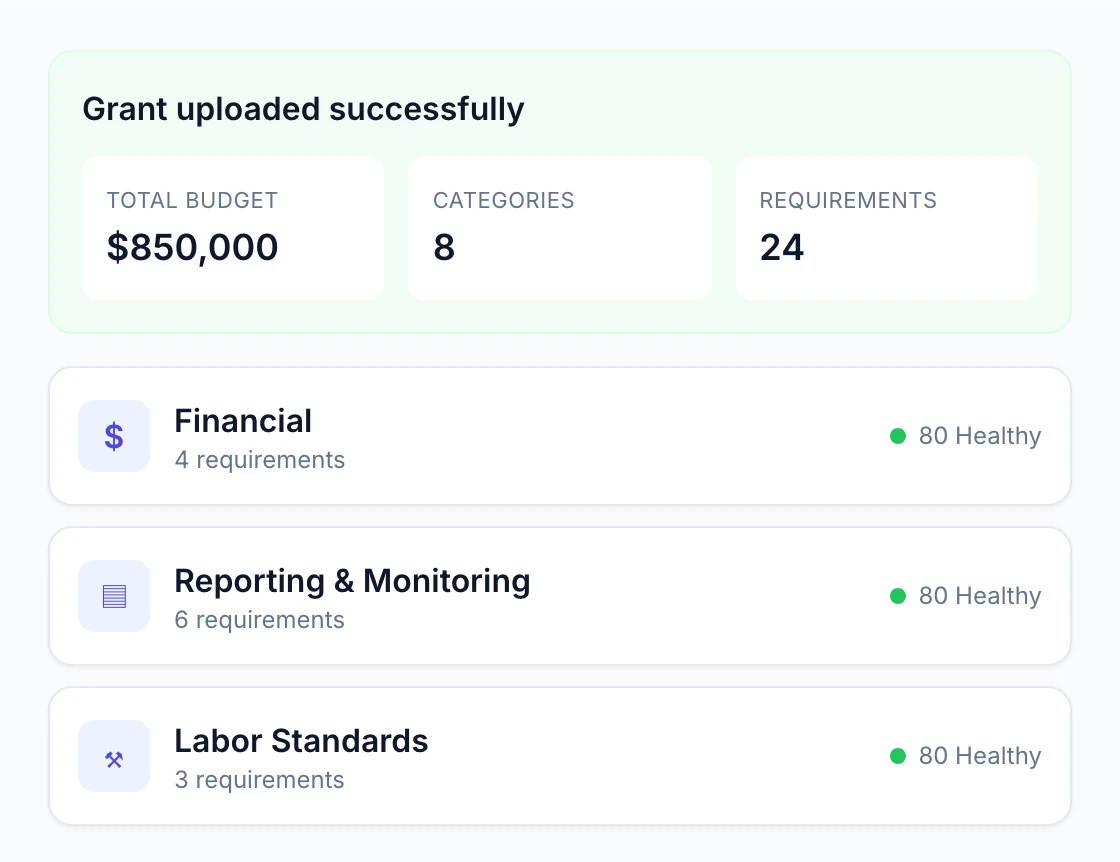
STEP 02
AI extracts the requirements
GrantGuard reads the document and pulls out requirements, deadlines, and budget conditions, each linked to its source for your review.
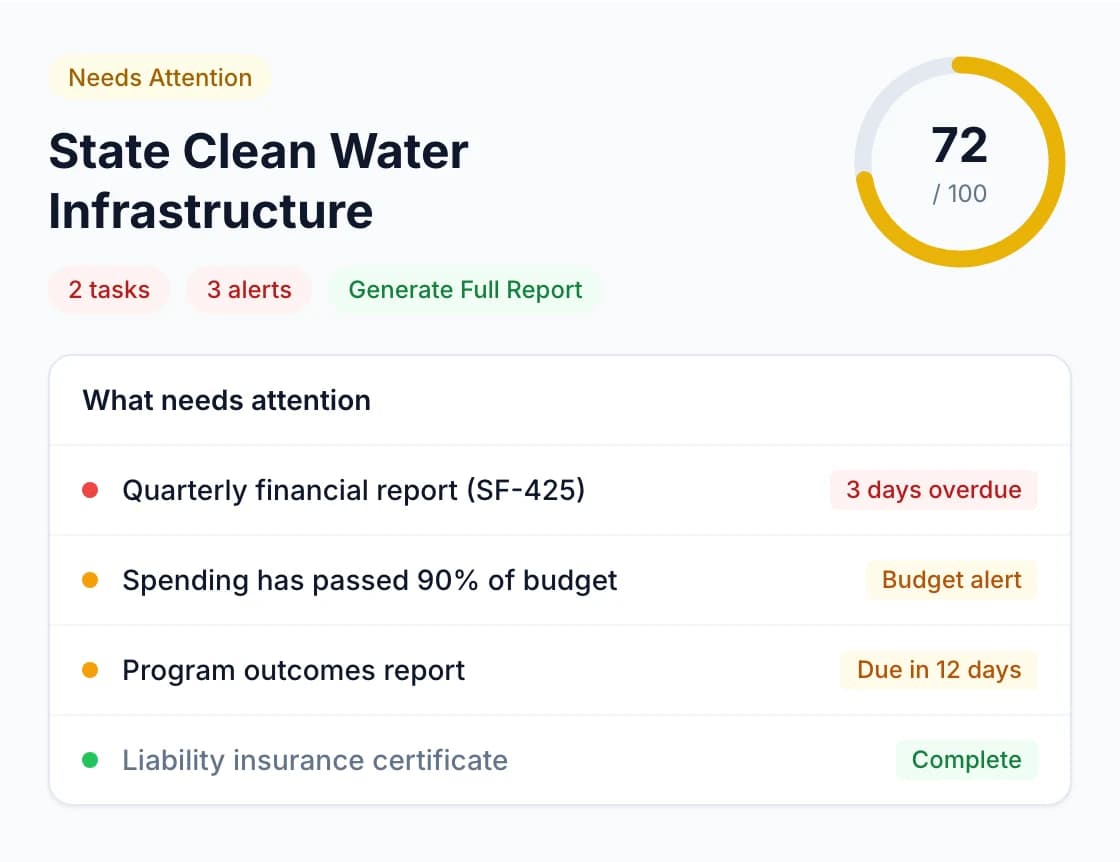
STEP 03
Track, assign, and report
Follow compliance health on your dashboard, assign tasks, get alerts before deadlines, and generate compliance reports when you need them.
Try it on one of your own grant agreements
Free for 30 days, no credit card. Request a trial, we set up your workspace within one business day, and you upload your first PDF.
Spreadsheets vs. GrantGuard
A spreadsheet can track grant compliance — as long as someone keeps it current. Here is what changes when the tracking is built for the job.

Finding requirements in a new agreement
- Spreadsheets
- Read the full agreement and retype each requirement by hand.
- GrantGuard
- Upload the PDF; AI extracts requirements, deadlines, and budget conditions for your review.
Checking where a requirement came from
- Spreadsheets
- Search the PDF again to find the clause.
- GrantGuard
- Each extracted requirement is shown with its source in the agreement.
Staying ahead of deadlines
- Spreadsheets
- Someone has to remember to open the file, or maintain separate calendar reminders.
- GrantGuard
- A deadline calendar and alerts notify your team before due dates.
Assigning the work
- Spreadsheets
- Email threads and an owner column that drifts out of date.
- GrantGuard
- Tasks tied to each requirement, with a clear owner.
Keeping supporting documents
- Spreadsheets
- Files scattered across shared drives and inboxes.
- GrantGuard
- Documents stored with the grant and requirement they support.
Watching the budget
- Spreadsheets
- A separate workbook to reconcile against the award.
- GrantGuard
- Budget and expense tracking alongside each grant's conditions.
Knowing where every grant stands
- Spreadsheets
- Build a status summary by hand whenever someone asks.
- GrantGuard
- Compliance health scores per grant and generated compliance reports.
| Task | Spreadsheets | GrantGuard |
|---|---|---|
| Finding requirements in a new agreement | Read the full agreement and retype each requirement by hand. | Upload the PDF; AI extracts requirements, deadlines, and budget conditions for your review. |
| Checking where a requirement came from | Search the PDF again to find the clause. | Each extracted requirement is shown with its source in the agreement. |
| Staying ahead of deadlines | Someone has to remember to open the file, or maintain separate calendar reminders. | A deadline calendar and alerts notify your team before due dates. |
| Assigning the work | Email threads and an owner column that drifts out of date. | Tasks tied to each requirement, with a clear owner. |
| Keeping supporting documents | Files scattered across shared drives and inboxes. | Documents stored with the grant and requirement they support. |
| Watching the budget | A separate workbook to reconcile against the award. | Budget and expense tracking alongside each grant's conditions. |
| Knowing where every grant stands | Build a status summary by hand whenever someone asks. | Compliance health scores per grant and generated compliance reports. |
Bring one grant agreement and compare it against your current tracker.
Simple, transparent pricing
Priced by the number of grants and dollars under management. Every paid plan starts with a free 30-day trial — no credit card required.
Starter
For small organizations
or $1,999/yr (save ~16%)
- Up to 5 grants
- Up to $2M under management
- 5 users
- AI document extraction
- Compliance dashboard
- Health scoring & alerts
- Budget tracking
- Deadline alerts & to-do list
- Report generation & exports
- Audit trail exports
- Tutorial + live onboarding
- Email support
Professional
For growing organizations
or $3,990/yr (save ~17%)
- Up to 15 grants
- Up to $10M under management
- 10 users
- Everything in Starter
- Priority support (24h)
- Tutorial + live onboarding
Premium
For large organizations
or $7,990/yr (save ~17%)
- Up to 50 grants
- Up to $50M under management
- 25 users
- Everything in Professional
- Priority + phone support
- Live onboarding + training
Enterprise
For the largest organizations
tailored to your needs
- Unlimited grants & AUM
- Unlimited users
- Everything in Premium
- SSO / SAML
- Custom integrations
- Dedicated account manager
- SLA guarantee
- Custom training
Not sure which plan fits? Book a 30-minute demo and we'll help you size it.
Less time spent on manual tracking
Reading agreements and retyping requirements into a spreadsheet is slow work. GrantGuard does the first pass so your team reviews instead of transcribes.
Fewer missed requirements
Non-compliance can put funding at risk. GrantGuard surfaces the requirements it finds in each agreement and keeps their deadlines in front of your team.
Catch issues earlier
Health scores and alerts flag grants that are drifting, so problems can be addressed before a report is due or a funder asks.
A cleaner record for future funding
Organized documents, tasks, and reports make it easier to show funders and auditors how each award was managed.
Frequently asked questions
Straight answers about the trial, the AI, and your data.
How does the free trial work?
Request a trial with your work email and our team sets up your workspace within one business day. You then get 30 days of access to upload your own grant agreements and see how GrantGuard tracks them. No credit card is required to start.
What happens after the 30 days?
There is no card on file, so nothing is charged. Before the trial ends you can choose a plan to keep going; if you don't, the trial simply ends.
What file types can I upload?
Grant agreements are uploaded as PDF files, up to 50 MB each. If your agreement is in another format, save or export it as a PDF first.
How accurate is the AI extraction?
Extraction is AI-assisted, not a substitute for your judgment. Every requirement GrantGuard extracts is shown alongside its source in the agreement so your team can review it, correct it, and confirm it before relying on it.
How is our data protected?
Data is encrypted in transit and at rest through our cloud providers, and access inside your workspace is role-based. Your documents are not used to train AI models. Our Privacy Policy describes how data is handled in more detail.
Which types of grants does GrantGuard handle?
Federal, state, and foundation grants. If the terms are written down in a grant agreement PDF, GrantGuard can extract the requirements, deadlines, and budget conditions for you to review and track.
Do you help us get set up?
Yes. Our team sets up your workspace, and every plan includes a tutorial and live onboarding. You can also book a 30-minute demo to walk through the product with your own grants in mind.
Can we cancel anytime?
Yes. You can cancel a paid subscription at any time, and cancellation takes effect at the end of your current billing period. See our Cancellation Policy for details.
Still have a question? Book a 30-minute demo, send us a message, or start your free trial.

See your own grant requirements in one place
Start a free 30-day trial with one of your grant agreements, or book a 30-minute demo and we'll walk through it together.
No credit card required · Workspace set up within one business day