
Comparison
GrantGuard vs. Smartsheet
Smartsheet is a flexible online spreadsheet that plenty of teams use to track grants. Here is what it does well, what you build and keep up yourself, and how GrantGuard compares, from Smartsheet's own published pages.
Finding requirements
- Smartsheet
- Typed in by hand
- GrantGuard
- Pulled from the agreement, with the page
Single Audit
- Smartsheet
- Build it yourself
- GrantGuard
- Draft federal award schedule included
Setup
- Smartsheet
- Design your own sheets
- GrantGuard
- Upload an agreement and start
When Smartsheet may fit better
- You already run other work in it, and someone on the team enjoys keeping the grant sheet current.
- You manage a few grants with simple reporting, and no federal award.
- You want one tool for every kind of project, not only grants.
- Price per person matters most: it starts at $9 per member a month.
If your tracker depends on one person remembering to update it, or an audit is coming, read on.
Side by side
What it is
- Smartsheet
- An online spreadsheet for managing any kind of project, program or process. [1]
- GrantGuard
- Built for one job: keeping awarded grants compliant.
Finding the requirements
- Smartsheet
- Someone reads the agreement and types each requirement into a sheet. Its AI tools work on what is already in the sheet. [2]
- GrantGuard
- Upload the agreement. Every requirement, deadline, and budget condition is pulled out with the clause and page it came from, for you to review.
Deadlines
- Smartsheet
- A calendar view and automated reminders, once someone has entered the dates. [1]
- GrantGuard
- One calendar across every grant, filled in from the agreements, with alerts and a morning email as far ahead as you choose.
Budget
- Smartsheet
- A budget sheet you build, or a partner-built grant budget template set that needs the Business plan. [4]
- GrantGuard
- Spent, committed, and available by category for each award, with an alert at 90% of budget.
Single Audit
- Smartsheet
- Its grant templates are spreadsheets for tracking applications, deadlines and expenses. A federal award schedule is yours to build. [3]
- GrantGuard
- A draft Schedule of Expenditures of Federal Awards for any fiscal year, with totals by federal agency, downloaded in Excel.
Proof
- Smartsheet
- Files attach to a sheet. Which file proves which requirement depends on how you set the sheet up. [1]
- GrantGuard
- Each document is stored with the requirement it proves, ready to hand to an auditor.
Setup
- Smartsheet
- Start from a blank sheet or a template, then design the columns, reminders and dashboards yourself. [3]
- GrantGuard
- No sheet to design. Upload an agreement and the grant's requirements, calendar and budget are laid out for you.
Price
- Smartsheet
- $9 or $19 per member a month, billed yearly. The $19 plan needs at least 3 members. Free for 30 days. [1]
- GrantGuard
- From $199 a month, sized by how many grants you manage. Free 30-day trial, no card.
Checked November 19, 2026, against Smartsheet's own pages under Sources; its plans and prices may have changed since. Smartsheet is a trademark of its owner; GrantGuard is not affiliated with it.
Every grant, deadline and task in one view
Signs the sheet is no longer enough
- You have a federal award, or expect a Single Audit.
- Nobody has checked the sheet against the agreement since it was built.
- An amendment changed a deadline or a budget line, and the sheet didn't.
- Only the person who built the tracker knows how it works.
- Closeout is coming and the final reports live in someone's memory.
- A funder or auditor has asked how you track compliance.
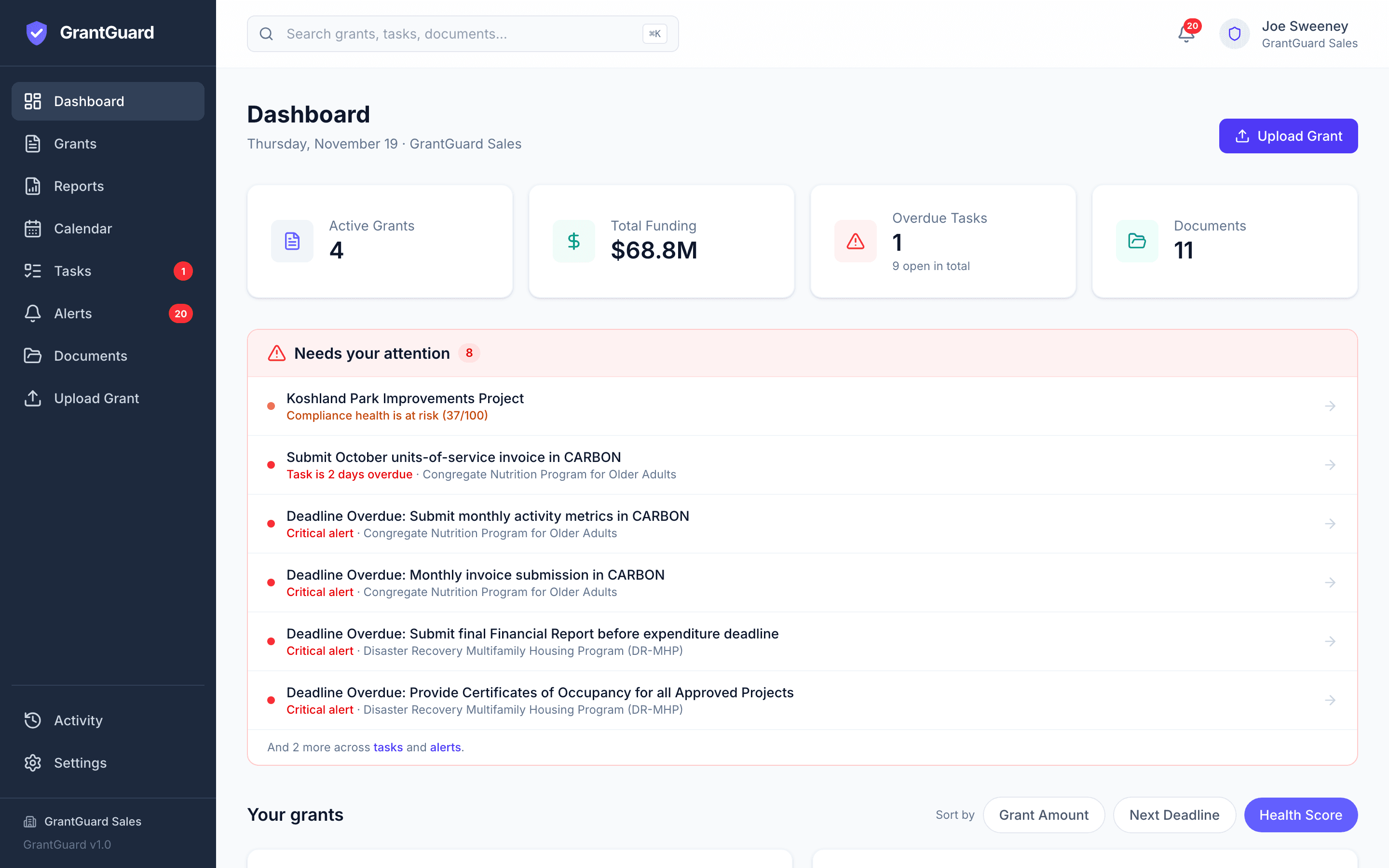
How switching works
- Step 1
Start the free trial
Your workspace is ready in about a minute. No card.
- Step 2
Upload one grant agreement
GrantGuard lists the requirements and deadlines, each with its clause and page. Compare them with your sheet.
- Step 3
Assign owners and set alerts
Keep the sheet open alongside until you trust the new one.
Prefer help? Send us your agreements and we'll load your first grants for you.
Sources
- Smartsheet: Pricing — Pro $9 per member a month billed yearly (1 to 10 members); Business $19 (3+ members); Enterprise custom. Calendar view, forms, automations and attachment storage listed by plan; "manage your projects, programs, and processes"; 30 days free, no credit card.
- Smartsheet Help: Generate formulas or text — AI tools generate formulas, text and summaries from the sheet's column names, column types and referenced cell data; "Formulas built with AI can only reference values in the current sheet."
- Smartsheet: Free grant tracking and grant management templates — Templates for a nonprofit grant tracking spreadsheet, a grant pipeline with dashboard, a grant tracking calendar and a grant expenses budget tracker, in Excel and Google Sheets formats.
- Smartsheet Marketplace: Grant Budget Management System — A partner-built template set (The Smart PM) for collecting and reporting grant expenses; offered with or without implementation services; "A Smartsheet Business account is all you need to use this solution."
Questions about Smartsheet and GrantGuard
Can we keep Smartsheet for everything else?
Yes. Many teams run projects, events and operations in Smartsheet. GrantGuard only handles awarded grants: the requirements, deadlines, budgets and documents for each one.
Can we bring over what is already in our grant sheet?
You don't need to retype it: GrantGuard reads the grant agreements themselves, which is where the requirements come from. If your sheet holds notes or dates you want to keep, export it and send it to support@grantguard.ai and we'll help bring them in.
Smartsheet has AI. How is GrantGuard's different?
Smartsheet's AI tools write formulas and summarize the data already in your sheets. GrantGuard reads the grant agreement itself and lists every requirement, deadline and budget condition, each with the clause and page it came from, for you to confirm.
Isn't Smartsheet cheaper?
For a small team, usually yes: $9 or $19 per member a month against $199 a month for GrantGuard's Starter plan. The difference is who does the work. In Smartsheet, someone builds the tracker, enters every requirement and keeps it current. If that is working for a few simple grants, it may be all you need.
Still have a question? Book a 45-minute demo, send us a message, or start your free trial.
More comparisons
- GrantGuard vs. SpreadsheetsWhen a spreadsheet is enough, and when it stops working.
- GrantGuard vs. Euna / AmpliFundPrice, setup and contract terms, from public government contracts.
- GrantGuard vs. InstrumentlFinding grants or keeping them compliant, or using both.
- GrantGuard vs. OpenGovA grants module in a government suite, or a grant compliance tool on its own.
- GrantGuard vs. BlackbaudAccounting software that tracks grant money, and how GrantGuard fits alongside it.
- GrantGuard vs. Grantwell / AvilaThree AI grant tools for local government, and what to ask on a demo.

See your own grant requirements in one place
Start a free 30-day trial with one of your grant agreements, or book a 45-minute demo and we'll walk through it together.
No credit card required · Workspace ready in about a minute